No-Code Integration for AI Agents with MuleSoft Composer
What Is MuleSoft Composer?
MuleSoft Composer is a no-code/low-code integration tool within the MuleSoft Anypoint Platform. It is designed for business users and citizen developers who want to build integration flows between enterprise systems — without programming knowledge.
Unlike the full Anypoint Platform, which is aimed at professional developers and requires MuleSoft-specific programming concepts, Composer offers a simplified, visually operable interface. Its scope is intentionally narrower: Composer is well-suited for structured, well-defined integration scenarios. For complex, enterprise-wide integration projects with custom business logic, the full Anypoint Platform remains the appropriate choice.
"AI-ready" in the context of Composer means concretely: existing APIs can be made available as data sources or actions for AI agents, large language models can be integrated via HTTP connectors, and flows can be structured so they function as tools within orchestration frameworks like MuleSoft Agent Fabric.
Composer vs. Classic Integration
| Aspect | Classic Integration | MuleSoft Composer |
|---|---|---|
| Development Time | Weeks to months | Hours to days |
| Required Skills | Developers | Business users |
| Maintenance | Custom code | Visual, simple |
| Scaling | Manual | Automatic |
| AI Integration | Custom development | Native connector |
Integrating AI Agents with Composer
Composer's key advantage for AI applications is a low barrier to entry: business teams can independently build data flows between enterprise systems and AI agents without waiting for IT development capacity.
Architecture: How AI Agents Access Enterprise Data
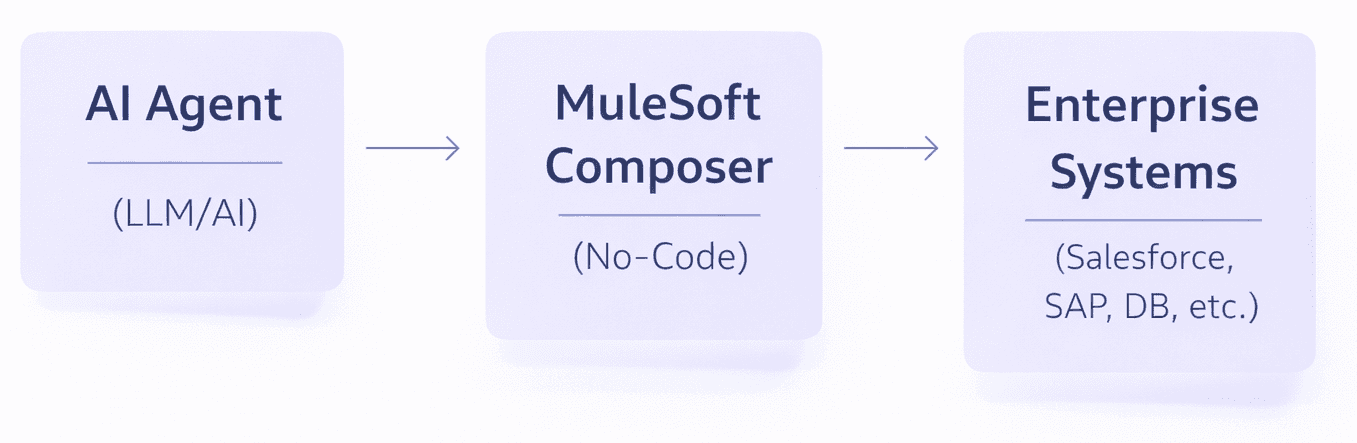
Composer acts as the orchestration layer: it receives requests from the AI agent, retrieves the required data from the respective source systems, transforms it into a unified format, and returns it to the agent — or writes results directly back into target systems.
Typical Scenarios:
- AI reads data from enterprise systems: AI agent queries current customer data from Salesforce or retrieves SAP data for automatic reports.
- AI writes data to enterprise systems: AI generates offers and saves them directly in Salesforce; automatic ticket creation in ServiceNow.
- AI triggers business processes: When anomalies are detected or AI recommendations are made, approval workflows are automatically initiated.
Practical Use Cases
1. Customer Service with AI
An AI chatbot handles customer inquiries and accesses CRM and ERP data in real time. Composer connects Salesforce Service Cloud and SAP, so the agent receives complete customer information without the need for IT to develop a dedicated API.
Business value: Shorter handling times, fewer escalations, fewer manual data lookups.
2. Sales Forecasting with AI
An AI agent analyzes sales data from Salesforce Sales Cloud and database systems, automatically distributing forecasts via Slack or Teams.
Business value: Sales teams receive weekly analyses without manual effort.
3. Supply Chain Monitoring
An AI agent monitors transportation management systems and ERP data, sending proactive alerts for delivery delays.
Business value: Earlier response times, fewer unplanned escalations.
4. Automated Financial Reporting
Monthly reports are automatically compiled from SAP/Oracle Financials and data warehouse systems and made available in BI tools.
Business value: Reduced manual reporting work, more consistent data quality.
Enterprise Connectors
Composer offers pre-built connectors for the most common enterprise systems. A selection:
Sales & CRM: Salesforce (Sales Cloud, Service Cloud, Marketing Cloud), HubSpot, Microsoft Dynamics 365
ERP & Finance: SAP, Oracle Financials, NetSuite
Databases: SQL Server, PostgreSQL, MySQL, MongoDB, Snowflake
Cloud & Collaboration: AWS S3, Google Drive, Microsoft 365, Slack, Microsoft Teams
Custom Interfaces: REST APIs, SOAP web services, GraphQL
For systems without a native connector, a generic HTTP connector is available that enables connectivity via standardized REST APIs.
Pricing and Licensing
MuleSoft Composer is available in several tiers:
| Plan | Description | Target Group |
|---|---|---|
| Composer Base | Basic integrations | Small teams |
| Composer Plus | Extended features + AI connector | Mid-market |
| Composer Pro | Full functionality + MuleSoft RPA | Enterprise |
Starting prices begin at approximately €500/month — however, actual costs depend on usage volume, number of connectors, and contractual terms. For a reliable estimate, we recommend a direct conversation with MuleSoft or a certified partner.
Best Practices for DACH Companies
1. Start with a Clearly Scoped Pilot Project
Choose a use case with well-documented data sources and a measurable outcome. Define success criteria upfront (e.g., time savings, error reduction) and document learnings systematically. Then scale step by step to additional use cases.
2. Plan for Governance from the Start
- Clear guidelines for Composer users, especially regarding access rights to production systems
- Version control for flows to make changes traceable
- Regular security reviews of active integrations
3. Engage Citizen Developers Purposefully
MuleSoft offers Composer-specific training and certifications. Business users can build simple flows independently within a few days — for more complex scenarios, IT involvement is advisable.
4. Monitoring and Error Handling
Composer includes built-in monitoring dashboards. Define escalation processes for critical integrations and set up alerting for errors in production flows.
Conclusion
MuleSoft Composer significantly lowers the barrier to enterprise integration. For companies that want to connect AI agents with existing systems, Composer offers a pragmatic first step — without long development cycles and without dependency on IT development capacity.
The core value lies not in complexity, but in speed: organizations with a well-defined use case today can set up a productive integration within hours, generating early insights for further development.
Want to use MuleSoft Composer for your AI initiatives? In a structured pilot project, we help you identify the right use case, set up the integration, and evaluate the results — so you can scale on a solid foundation.