What Is Data Cloud — and Why Is It Relevant for AI Agents?
Salesforce Data Cloud is Salesforce's platform for unifying and activating customer data from different sources. At its core, Data Cloud solves a problem most enterprises have: customer data is scattered across dozens of systems — CRM, marketing automation, e-commerce, support tickets, ERP, external data sources — and in isolated silos, they offer no complete view of the customer.
The Evolution: From CDP to Agent Foundation
Data Cloud has evolved in three phases:
Phase 1 (2022–2023): Customer Data Platform. Unifying customer data for marketing segmentation and personalization.
Phase 2 (2024–2025): Unified Data Layer. Expansion beyond marketing to sales, service, and commerce. Integration with the entire Salesforce ecosystem.
Phase 3 (2025–2026): Agent Foundation. Data Cloud as the knowledge base for AI agents. Agentforce agents access unified customer data to make informed decisions and execute actions.
Why AI Agents Need Data
An AI agent without access to current, context-rich data is like a new employee on day one — they have general knowledge but know neither your customers nor your processes. Data Cloud transforms this generic agent into one that:
- Knows which products Customer X purchased in the last 12 months
- Understands that Customer Y has three open support tickets and is dissatisfied
- Recognizes that Customer Z is currently viewing the premium package on your website
- Knows the credit history, customer lifetime value, and churn probability
Key Data Cloud Features for AI
Unified Customer Profile
Data Cloud creates a unified customer profile — the "Customer 360" — from data across sources. Records from CRM, email marketing, web analytics, support, and external sources are merged into a single profile through identity resolution.
For AI agents: The agent doesn't see three different records for the same customer (one in CRM, one in marketing, one in support), but a complete picture. This prevents contradictory or redundant actions.
Zero-Copy Data Federation
One of the newest and most important features: Data Cloud can access external data without physically copying it. Through connectors to Snowflake, Databricks, Google BigQuery, and Amazon Redshift, data is queried in real time — it stays in the source platform.
For DACH enterprises: This is highly relevant from a GDPR perspective. When data isn't copied, many questions about data duplication, retention periods, and deletion obligations are eliminated. The data remains under the governance of the source platform.
Calculated Insights and Segmentation
Data Cloud can automatically compute KPIs from unified data: customer lifetime value, churn probability, engagement score, purchase likelihood. These metrics are available to AI agents as a decision basis.
Vector Database for Unstructured Data
Data Cloud integrates a vector database that makes unstructured data (emails, support chats, meeting notes) semantically searchable. AI agents can access not only structured CRM fields but also understand context from free-text communications.
Data Cloud + Agentforce: The Architecture
The integration of Data Cloud and Agentforce follows a clear architecture:
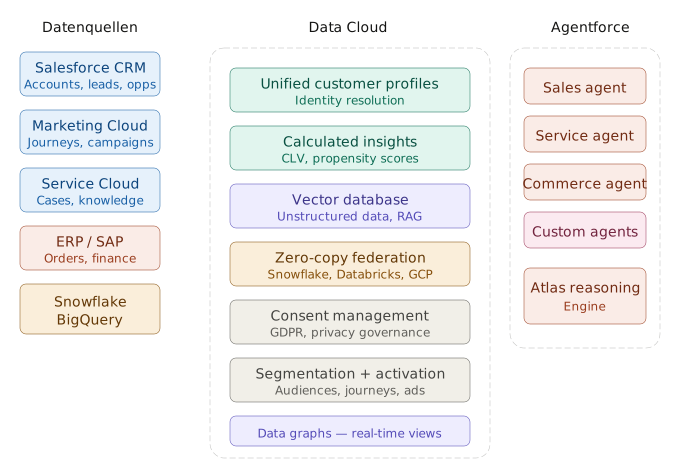
How Agentforce Accesses Data Cloud
-
Topic-based access: Agentforce agents are configured via "Topics" that define which data and actions an agent may access. Data Cloud segments and insights are provided as topics.
-
Grounding with Data Cloud: Agents can "ground" their responses on Data Cloud data — meaning they base their recommendations on real customer data rather than general model knowledge. This significantly reduces hallucinations.
-
Action execution: Based on Data Cloud insights, an agent can trigger actions: create a case, trigger a campaign, personalize an offer, or initiate an escalation.
Implementation: Preparing Data Cloud for Agentforce
Step 1: Identify and Prioritize Data Sources
Not all data needs to be in Data Cloud immediately. Start with sources that offer the highest value for AI agents:
High priority:
- Salesforce CRM (contacts, accounts, opportunities, cases)
- Email and marketing interactions
- Website behavioral data
- Support ticket history
Medium priority:
- ERP/order data
- Payment history
- Social media interactions
Low priority (but long-term valuable):
- IoT data (for industrial companies)
- External market data
- Partner ecosystem data
Step 2: Set Up Data Model in Data Cloud
Data Cloud works with its own data model based on standard objects:
- Individual: The central customer record
- Unified Individual: The merged profile after identity resolution
- Data Stream: Incoming data flows from various sources
- Calculated Insight: Computed KPIs and metrics
Define which fields from which sources flow into which Data Cloud objects. Pay particular attention to:
- Data quality: Garbage in, garbage out — clean data before integration
- Field mapping: Consistent field assignment across systems
- Update frequency: Which data needs real-time sync, which can be batched?
Step 3: Configure Identity Resolution
Identity resolution is Data Cloud's heart. It connects records from different sources into a single customer profile. Configure:
- Match rules: Which fields are used for matching? (email, phone, name + address)
- Match confidence: At what threshold are two records considered the same customer?
- Reconciliation rules: Which value wins in conflicts? (e.g., CRM address vs. e-commerce address)
Step 4: Set Up Consent Management
For GDPR compliance, consent management is not optional:
- Import consent data: Ensure each customer's consent preferences are represented in Data Cloud
- Purpose-based access: Configure agents to access only data for which valid consent exists
- Right to erasure: Implement deletion request processes spanning all connected systems
Step 5: Configure Agentforce Topics
Create topics that enable Agentforce agents to access Data Cloud data:
- Sales agent: Access to purchase history, CLV, cross-selling recommendations, open quotes
- Service agent: Access to support history, satisfaction score, ongoing cases, product usage
- Commerce agent: Access to browsing behavior, cart abandonment, personalized product recommendations
GDPR Compliance: Data Cloud and Data Privacy
Data Cloud processes and stores customer data — making it subject to full GDPR requirements. The key aspects:
Legal Bases for Data Processing
For every data source integrated into Data Cloud, you must demonstrate a legal basis:
- Art. 6(1)(a): Data subject consent
- Art. 6(1)(b): Contract performance
- Art. 6(1)(f): Legitimate interest (with balancing test)
Exercise particular caution when merging data from different sources: consent for marketing emails does not automatically authorize using the same data for AI-agent-based personalization.
Data Storage Location
Salesforce offers EU Hyperforce regions for Data Cloud (Frankfurt, Paris). For DACH enterprises, we explicitly recommend using an EU region. With zero-copy federation, data stays in the source platform — verify that it's also GDPR-compliantly hosted.
Retention Requirements and Deletion Periods
Define clear retention periods for each data type in Data Cloud:
- Transaction data: Per UGB/HGB (7–10 years)
- Marketing interactions: Typically 2–3 years
- Consent records: As long as the business relationship exists
- Browsing data: Short retention (30–90 days)
Data Processing Agreement (DPA)
Execute a GDPR-compliant data processing agreement with Salesforce. Salesforce offers a standard DPA covering processing on EU servers and exclusion of data use for Salesforce's own training.
Practical Scenarios
Scenario 1: Proactive Service Agent for a Telco
Setup: Data Cloud unifies contract data, usage patterns, support history, and network outage reports.
Agent behavior: When a customer calls, the service agent knows:
- Contract ends in 2 months → retention risk
- 3 outage reports last month → dissatisfied
- Data consumption increasing → upgrade potential
Action: The agent proactively offers an upgrade with contract extension and compensation for outages — all in a single contact.
Scenario 2: Cross-Selling Agent for a B2B Wholesaler
Setup: Data Cloud connects SAP order data (via zero-copy), Salesforce CRM, and web analytics.
Agent behavior: Recognizes that Customer Y regularly orders Product A but never the complementary Product B — which 80% of similar customers also purchase.
Action: Generates personalized cross-selling recommendation with appropriate volume discount, based on order history and customer segment.
Scenario 3: Compliance Agent for an Insurance Company
Setup: Data Cloud harmonizes customer data, contract data, claims, and compliance data.
Agent behavior: Identifies customers requiring new IDD advisory protocols because their risk profiles have changed.
Action: Automatically creates follow-up tasks for advisors and generates pre-filled advisory protocols based on current customer data.
Frequently Asked Questions
What does Data Cloud cost?
Data Cloud is already included in many Salesforce editions (Enterprise+). Additional costs arise from data volume (credits for records and queries), additional connectors, and premium features. Exact costs depend on your data volume and requirements.
Do we need Data Cloud if we already have a data warehouse?
Yes, if you want to use Agentforce. Data Cloud doesn't replace a data warehouse — it complements it. With zero-copy federation, you can connect your existing warehouse without duplicating data. Data Cloud adds the Salesforce-specific customer perspective and Agentforce integration.
How long does implementation take?
An MVP (Minimum Viable Product) with 2–3 data sources and a first agent topic is achievable in 4–8 weeks. A complete implementation with all sources, identity resolution, and GDPR compliance typically takes 3–6 months.
Conclusion
Salesforce Data Cloud is no longer just a Customer Data Platform — it's the data foundation that makes the difference between generic and contextually intelligent AI agents. For DACH enterprises using or planning Agentforce, Data Cloud is the logical next step: it transforms your fragmented customer data into the knowledge base on which your agents make informed decisions.
The key to success lies in clean data integration, consistent consent management, and phased introduction. Start with the most valuable data sources, establish GDPR compliance from day one, and scale based on measurable results.
Want to take your Salesforce environment to the next level with Data Cloud and Agentforce? As a Salesforce consultancy with AI expertise, we support you from data integration to productive AI agents. Contact us.